








تحدي المراجعة
جزء من قسم الواجهة الأمامية العملية في رحلة HTML على Coddy. الدرس 25 من 35.

التحدي
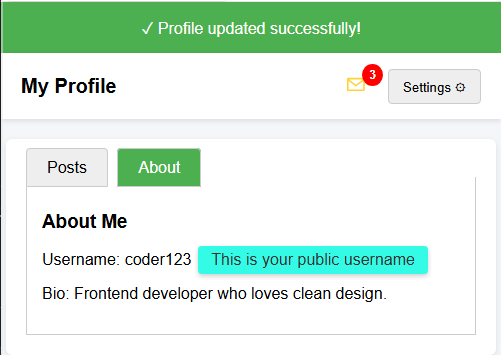
سهللقد تم تزويدك بصفحة HTML تحتوي على مكونات واجهة مستخدم مختلفة (قائمة منسدلة، تبويبات، شارة، تلميح، وشريط إشعارات).
مهمتك هي إكمال CSS بحيث يبدو كل شيء ويعمل بشكل صحيح.
مهمتك:
- قم بتنسيق شريط الإشعارات بخلفية خضراء (rgb(76, 175, 80)) ونص أبيض.
- قم بوضع الشارة في الزاوية العلوية اليمنى من أيقونة الرسالة (استخدم
position: absolute، وtop، وright). - قم بإخفاء القائمة المنسدلة افتراضياً.
- قم بإخفاء مدخلات الراديو (radio inputs) المستخدمة للتبويبات.
- قم بتنسيق التلميح (tooltip) بلون خلفية، وزوايا مستديرة، وحشوة (padding).
يجب أن تبدو النتيجة النهائية مثل الصورة أدناه.
جرّب بنفسك
<!DOCTYPE html>
<html>
<head>
  <title>Recap Challenge</title>
  <style>
    body {
      font-family: Arial, sans-serif;
      background: #f4f6f9;
      margin: 0;
      padding: 0;
    }

    /* Notification Banner */
    .notification {
      display: flex;
      align-items: center;
      justify-content: center;
      padding: 15px;
      font-size: 16px;
    }

    /* Profile Header */
    .header {
      display: flex;
      justify-content: space-between;
      align-items: center;
      background: white;
      padding: 15px 20px;
      box-shadow: 0 2px 5px rgba(0,0,0,0.1);
    }

    .header h1 {
      margin: 0;
      font-size: 20px;
    }

    /* Dropdown */
    .dropdown {
      position: relative;
      display: inline-block;
    }

    .dropdown-button {
      padding: 8px 14px;
      background: #eee;
      border: 1px solid #ccc;
      cursor: pointer;
      border-radius: 4px;
    }

    .dropdown-content {
      position: absolute;
      right: 0;
      background: white;
      box-shadow: 0 2px 6px rgba(0,0,0,0.2);
      border-radius: 4px;
      margin-top: 5px;
      min-width: 150px;
      z-index: 10;
    }

    .dropdown-content a {
      display: block;
      padding: 10px;
      text-decoration: none;
      color: #333;
    }

    .dropdown-content a:hover {
      background: #f2f2f2;
    }

    .dropdown:hover .dropdown-content {
      display: block;
    }

    /* Tabs */
    .tabs {
      margin: 20px;
      background: white;
      border-radius: 6px;
      box-shadow: 0 2px 6px rgba(0,0,0,0.1);
      padding: 20px;
      width: 90%;
      max-width: 600px;
      margin-left: auto;
      margin-right: auto;
    }

    .tabs label {
      padding: 10px 20px;
      cursor: pointer;
      background: #eee;
      border: 1px solid #ccc;
      margin-right: 5px;
      border-radius: 4px 4px 0 0;
    }

    .tabs label:hover {
      background: #ddd;
    }

    .tab-content {
      display: none;
      border: 1px solid #ccc;
      border-top: none;
      padding: 15px;
      background: white;
    }

    #tab1:checked ~ #content1,
    #tab2:checked ~ #content2 {
      display: block;
    }

    #tab1:checked + label,
    #tab2:checked + label {
      background: #4CAF50;
      color: white;
    }

    /* Badge */
    .icon {
      position: relative;
      font-size: 22px;
      margin-right: 15px;
    }

    .badge {
      background: red;
      color: white;
      font-size: 12px;
      font-weight: bold;
      padding: 4px 7px;
      border-radius: 50%;
    }

    /* Tooltip */
    .tooltip {
      position: relative;
      display: inline-block;
      cursor: pointer;
    }

    .tooltip .tooltip-text {
      visibility: hidden;
      width: 160px;
      color: #333;
      text-align: center;
      position: absolute;
      left: 110%;
      top: 50%;
      transform: translateY(-50%);
      white-space: nowrap;
      box-shadow: 0 2px 5px rgba(0,0,0,0.2);
    }

    .tooltip:hover .tooltip-text {
      visibility: visible;
    }
  </style>
</head>
<body>

  <!-- شريط الإشعارات -->
  <div class="notification">
    ✓ Profile updated successfully!
  </div>

  <!-- الرأس (Header) -->
  <div class="header">
    <h1>My Profile</h1>
    <div>
      <span class="icon">✉ <span class="badge">3</span></span>
      <div class="dropdown">
        <button class="dropdown-button">Settings ⚙️</button>
        <div class="dropdown-content">
          <a href="#">Edit Profile</a>
          <a href="#">Account</a>
          <a href="#">Logout</a>
        </div>
      </div>
    </div>
  </div>

  <!-- علامات التبويب (Tabs) -->
  <div class="tabs">
    <input type="radio" id="tab1" name="tab" checked>
    <label for="tab1">Posts</label>
    <input type="radio" id="tab2" name="tab">
    <label for="tab2">About</label>

    <div id="content1" class="tab-content">
      <h3>Recent Posts</h3>
      <p>Here are your latest posts.</p>
    </div>
    <div id="content2" class="tab-content">
      <h3>About Me</h3>
      <p>Username: <span class="tooltip">coder123
        <span class="tooltip-text">This is your public username</span>
      </span></p>
      <p>Bio: Frontend developer who loves clean design.</p>
    </div>
  </div>

</body>
</html>
جميع دروس الواجهة الأمامية العملية
2إستراتيجية الهاتف المحمول أولاً
ماذا يعني "الهاتف المحمول أولاً"تنسيق النصوص للهاتف المحمول أولاًالتنقل للهاتف المحمول أولاًالصور للهاتف المحمول أولاًالنماذج للهاتف المحمول أولاًتحدي المراجعة5مكونات واجهة المستخدم
القائمة المنسدلةعلامات التبويبالشاراتتلميحات الأدواتلافتات الإشعاراتتحدي المراجعةتدرّب بنفسك: Playground لـ Web