








Sorting
Lesson 19 of 23 in Coddy's C++ - Standard Template Library course.
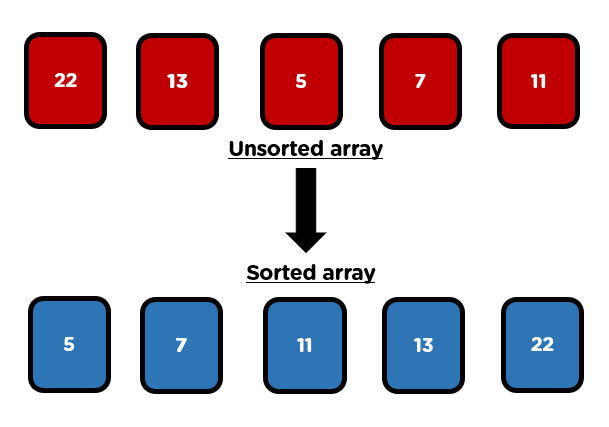
Sorting, in general is a concept where the elements of a container are rearranged in a logical order.
Sorting is one of the most basic and fundamental technique applied through functions to data. This means that sorting allows us arrange a sequence of elements in a particular fashion that we want following a logical order.
Sorting algorithms help in manipulating data, as well as helping with solving many mathematical and coding problems.
*In order to use the methods we need to include the algorithm header file at the top of our C++ file using #include <algorithm>.
You will learn about the built-in functions in the STL algorithm library who are used for sorting data.
The three functions we will be studying are:
sort()is_sorted()partial_sort()
sort method
The sort() method of the STL, sorts the contents of the given range. The method needs a starting iterator and an ending iterator and it will sort in an ascending order the elements in that range.
We can use it in two versions:
sort(starting_iterator, ending_iterator)- sorts the range defined by the iterators in an ascending ordersort(starting_iterator, ending_iterator, comparing_function)- sorts the range defined by the iterators, but based on the function given as the third parameter
vector<int> numbers = {3, 5, 1, 2, 4};

sort(numbers.begin(), numbers.end());

for(auto i = numbers.begin(); i != numbers.end(); i++)
	cout << *i << " ";
Output:
1 2 3 4 5As you can see from the code above, the sort() method sorted the vector in an ascending order.
bool compare(int a, int b)
{
	return a > b; // return 1 if a is greater than b
}

int main()
{
	vector<int> numbers = {3, 5, 1, 2, 4};

	sort(numbers.begin(), numbers.end(), compare);

	for(auto i = numbers.begin(); i != numbers.end(); i++)
		cout << *i << " ";
Output:
5 4 3 2 1So, you can see how we used the second version of the sort method. Creating the compare() function in a way so it returns true if a is greater than b. This lets us sort the vector in a descending order.
is_sorted method
The is_sorted() method is a function of the STL that return either true or false if the given range is sorted, or not.
There are also two versions of the is_sorted() method, exactly like the sort() method:
is_sorted(starting_iterator, ending_iterator)- Checks if the range defined by the two iterators is sorted in an ascending order, return true if yes, returns false otherwiseis_sorted(starting_iterator, ending_iterator, comparing_function)- Check if the range defined by the two iterators is sorted, but based on the comparing function.
vector<int> numbers = {3, 5, 1, 2, 4};

cout << is_sorted(numbers.begin(), numbers.end()) << endl;

sort(numbers.begin(), numbers.end());

cout << is_sorted(numbers.begin(), numbers.end());
Output:
0
1bool compare(int a, int b)
{
return a > b; // return 1 if a is greater than b
}
int main()
{
vector<int> numbers = {3, 5, 1, 2, 4};
cout << is_sorted(numbers.begin(), numbers.end(), compare) << endl;
sort(numbers.begin(), numbers.end(), compare);
cout << is_sorted(numbers.begin(), numbers.end(), compare);Output:
0
1partial_sort method
The parital_sort() method sorts the first half of the elements in the given range and leaves the other half of the elements as they were initially.
It also has two versions:
partial_sort(start, middle, end)- Sorts the range from start to end in such way that the elements from the starting iterator to the middle iterator are sorted in an ascending order and the elements from the middle iterator to the ending iterator are left as they were initiallypartial_sort(start, middle, end, compare)- Sorts the range from start to end such that the elements from start to middle are sorted based on the comparing function and the elements from the middle to the end are left as they were initially
vector<int> numbers = {3, 5, 1, 2, 4, 10, 7};

partial_sort(numbers.begin(), numbers.begin() + 4, numbers.end());

for(auto i = numbers.begin(); i != numbers.end(); i++)
		cout << *i << " ";
Output:
1 2 3 4 5 10 7bool compare(int a, int b)
{
return a > b; // return 1 if a is greater than b
}
int main()
{
vector<int> numbers = {3, 5, 1, 2, 4, 10, 7};
partial_sort(numbers.begin(), numbers.begin() + 3, numbers.end(), compare);
for(auto i = numbers.begin(); i != numbers.end(); i++)
cout << *i << " ";Output:
10 7 5 1 2 3 4As you can see, the partial_sort() method works a little differently, but don't bother with that, you will rarely use a partial sort.
For now, remember what sorting is, remember the sort() and is_sorted() method correctly and pracitce using them.

Challenge
MediumGiven a number N from input. In the next line there are N numbers. Output the numbers in an ascending order first, then output them in a descending order splitting them with a single space.
Input
3
5 15 10
Output
5 10 15 15 10 5Try it yourself
#include <vector>
#include <algorithm>
#include <iostream>

using namespace std;

// Enter your code here

int main()
{
    // Enter your code here

    return 0;
}All lessons in C++ - Standard Template Library
Practice on your own: Online C++ compiler