








Max Capacity
Lesson 8 of 21 in Coddy's Slices and Maps in Golang course.
In the last lesson, we talked about capacity and learned that when we perform slicing, the capacity is determined from the start position to the end of the slice. However, we can use the slice operator or expression to control or limit the capacity. Let's go through an example:
We know that the slice operator syntax is like this: <strong>[start:stop]</strong>, but we can add a third option to this operator to be like this: <strong>[start:stop:capacity]</strong>. The third option allows us to set the maximum capacity of the slice.
So, using a full slice expression, you can slice a slice and, at the same time, limit the capacity of the returned slice from this slice expression.
Suppose we have a slice like this:
numbers := []int{1, 2, 3, 4, 5, 6}Let's slice this to get 3 elements:
numbers := []int{1, 2, 3, 4, 5, 6}
numSlice := numbers[1:4]
We can represent this like this:
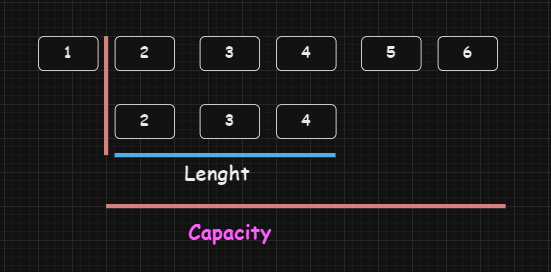
So here, we get 3 elements and a capacity of 5, just like what this picture demonstrates.
Now, if we use the capacity in the slice operator and set it, for example, to 3:
numbers := []int{1, 2, 3, 4, 5, 6}
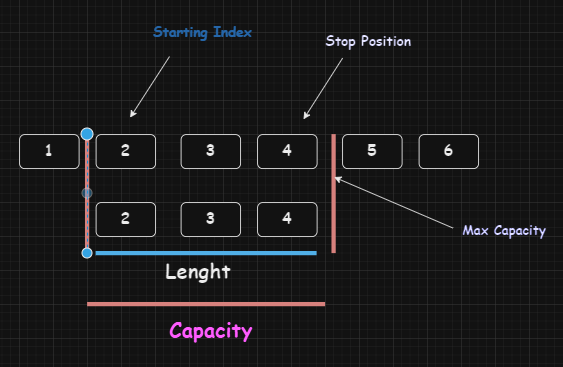
numSlice := numbers[1:4:4]
Think of the capacity just like the element position here; we set it to 4. But note that the stopping position cannot be greater than the capacity position.

Challenge
EasyIn the given code, we define a slice named coddy with 6 elements.
- Perform a slicing operation to extract the elements "Tech" and "Learn Golang" from the coddy slice while ensuring that the capacity will be 4.
Try it yourself
package main

import (
	"fmt"
)

func main() {
    // A Slice of 6 elements
	coddy := []string{"Coddy","Tech","Learn Golang","Learn JavaScript","C++","C#"}
	// Do Slicing Here

	// Print the elements to the Screen
	fmt.Println("Elements:" ?)
	// Print the Capacity
	fmt.Println("Capacity:" ?)

}
All lessons in Slices and Maps in Golang
1Introduction
IntroductionPractice on your own: Online Go compiler