








Binary and decimal numbers
Lesson 3 of 17 in Coddy's Bit Manipulation course.
In the subsequent lessons, we will be dealing with binary numbers and operations we can perform on them. So it is important for you to know how to convert binary numbers to base 10 numbers and vice versa, as C++ and most other languages out there use base 10 representation prevalently. (FYI- Base 10 numbers are also called decimal numbers and base 2 numbers are also known as binary numbers. We will be using these terms interchangeably throughout this course.)
Let's look into it.
Converting base 10 number into binary (base 2)
Step-1: Divide the decimal number by 2 with integer remainder and keep dividing until you are left with a zero or a one.
Step-2: Note down the remainder for each division by 2 and write it along with the dividend.
Step-3: Then write down these remainders, reading from downward to upward. You will get your binary number.
Let's understand the above steps with an illustration.
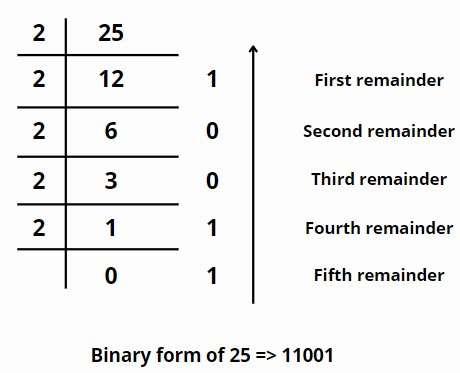
In the example above, we have taken (25)10. And as per the steps given above, we firstly have repeatedly divided 25 by 2 and then have written integer remainders along with the respective dividends. Then read up from down and the number we get is (11001)2 which is the binary form of (25)10.
The rightmost digit in a binary number is called LSB (Least significant bit) and the leftmost bit is called MSB (Most significant bit).
Conversion from binary to decimal number
This is rather easy to do.
Step-1: Write down the binary number.
Step-2: Write powers of 2 (20, 21, 22....so on until the last digit) below the digits of the given binary number, starting from left.
Step-3: Multiply these digits with the respective powers of 2 placed below them. Add them together and the number you get is in decimal form.
Let's verify the binary number we got above, that is (11001)2 for (25)10 using these steps.
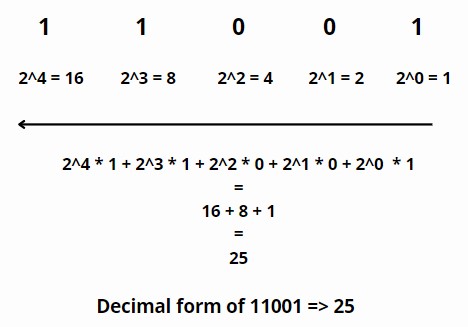
So following the above steps, we first wrote down the number and then wrote down powers of two below the digits of the binary number, starting from left, multiplied them to respective digits above them, and added them together to get the decimal form of the number.
Try it out yourself too! Take random numbers, convert them from binary to decimal, and the other way around. Make sure you get comfortable with binary and decimal numbers, as the whole course revolves around them. Let's move onto bitwise operators from the next lesson.
Try it yourself
This lesson doesn't include a code challenge.
All lessons in Bit Manipulation
1Introduction and basics
What is bit manipulation?Why we need bit manipulation?Binary and decimal numbersNOT & OR operatorsAND operatorXOR operatorRight and left shift operatorsBitwise Operators SummaryPractice on your own: Online C++ compiler
Check a conversion: Number Base Converter