








Introduction to Array
Lesson 2 of 18 in Coddy's Array Methods in JavaScript course.
Let's dive into the fascinating world of arrays in JavaScript!
Arrays are a fundamental data structure in JavaScript, used to store ordered collections of elements.
An array is a special variable, which can hold more than one value.
Why use arrays?
If you have a list of items (such as student names), storing the student names in a single variables could be done like this :-
let student_1 = "John";
let student_2 = "Smith";
let student_3 = "Jack";
However, what if you want to loop through the students and find a specific one? And what if you had not 3 students, but 300?
The solution is an array!
Creating an Array
Using an array literal is the easiest way to create a JavaScript Array.
Syntax:
const array_name = [item1, item2, item3, ...]; Above, an array named "array_name" has been created.
Accessing Array Elements
An array can hold many values under a single name, and you can access the values by referring to an index number. As illustrated in the diagram below:
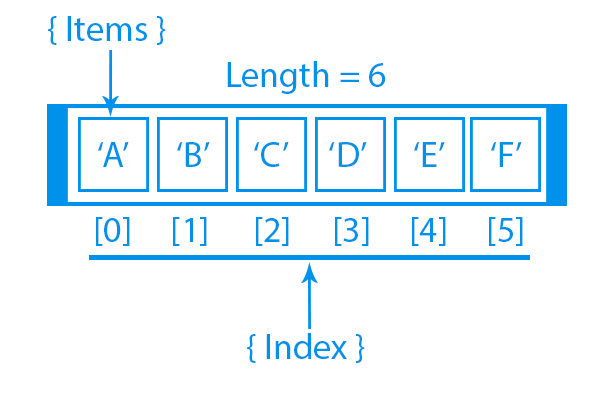
An array with 6 elements is created. The first element 'A' is at index [0], the second element 'B' is at index [1], and so on.
To access any element, we can use this indexing with the array name.
let element = array_name[index];For example:
const charArray = ['A', 'B', 'C', 'D', 'E', 'F'];
let charElement = charArray[2];
console.log(charElement);    // output: 'C'
Here, you are accessing the second element 'C' using its index.
Note: Array indexes start at 0.
[0] represents the first element. [1] represents the second element and so forth.

Challenge
EasyWrite a function named arrayFunction that gets an array of strings and returns the second element in the array.
Try it yourself
// Write code here
All lessons in Array Methods in JavaScript
Practice on your own: Online JavaScript compiler