








Slice with Make
Lesson 12 of 21 in Coddy's Slices and Maps in Golang course.
In the last lessons, we created slices using slice literals. However, there's another function called <strong>make</strong>. It allows you to allocate a backing array for a slice with a given length and capacity. The reason for having a function like <strong>make</strong> is because a slice doesn't have a defined length upfront. So, the <strong>make</strong> function allows you to create a slice with a specified length.
But don't be mistaken; its length doesn't become fixed. You can still append to it.
The syntax for the <strong>make</strong> function is as follows:
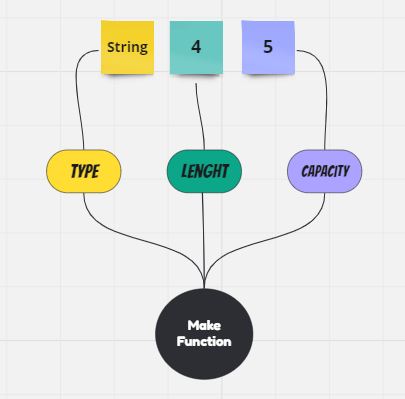
mySlice = make([]string, 4)You simply use <strong>make</strong>, and the first argument (<strong>[]string</strong>) describes the type of the slice, while the second argument (<strong>4</strong>) tells <strong>make</strong> the length that we need for our slice. The second argument also describes the capacity of the backing array. So, the returned slice's length and capacity become equal.
Now, the question is why we need to use the <strong>make</strong> function to create a slice if we can just use the simple slice literal?
Well, the answer is that in some situations, we need to add new values to a slice, and if it doesn't have enough capacity, it will create a new backing array. This operation is a bit expensive in terms of memory because it requires reallocation. The <strong>make</strong> function prevents this reallocation by preallocating space in memory.
With <strong>make</strong>, we can specify both length and capacity with different values like this:
mySlice = make([]string, 4, 6)In general, the <strong>make</strong> function can be represented as shown below:

Challenge
EasyUsing the <strong>make</strong> function, create a slice named <strong>coddy</strong> with a length of 4 and a capacity of 5.
- Add the value "Learn Golang" to index 0.
- Add the value "Coddy.tech" to index 3.
- Iterate over this slice using the
<strong>range</strong>keyword and print the index and the value to the screen.
Try it yourself
package main

import "fmt"

func main() {
    // Create the coddy slice with make

 	// Add elements at the index 0 and 3


    // Iterate Over the coddy slice


}All lessons in Slices and Maps in Golang
1Introduction
Introduction3Slices Behind the Scene
Slice is an ArraySlice with MakeCopy a SliceDelete an ElementRecap Challenge #1Recap Challenge #2Practice on your own: Online Go compiler