








Modal (open/close)
Part of the JavaScript in Action section of Coddy's HTML journey. Lesson 3 of 27.
A modal is a small window that appears “on top” of the page to grab the user’s attention. It’s often used for login forms, notifications, or confirmations. This is how it may look like:
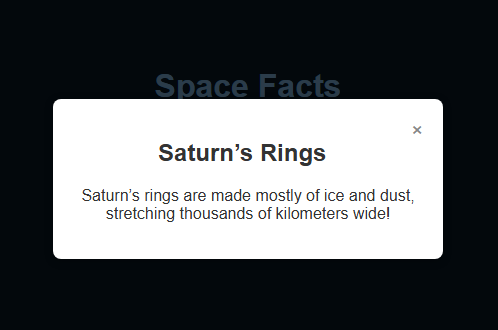
Key ideas:
- The modal is hidden by default (
display: none). - Clicking the “Open” button runs the
openModal()function → setsdisplay: block.
- Inside the modal, the close button (×) runs the
closeModal()function → setsdisplay: none. - Often you can also make it close by clicking outside the modal (on the dark overlay).
<!-- Button to open modal -->
<button onclick="openModal()">Open Modal</button>
<!-- Modal overlay + content -->
<div id="overlay" style="display:none;">
  <div class="modal">
    <span onclick="closeModal()">×</span>
    <p>This is a modal window.</p>
  </div>
</div>
<script>
  function openModal() {
    document.getElementById("overlay").style.display = "block";
  }
  function closeModal() {
    document.getElementById("overlay").style.display = "none";
  }
</script>
Challenge
EasyWe have a webpage with space-themed buttons that show interesting space facts in a modal window. A function called openModal is triggered when any space fact button is clicked. Your task is to write the code inside openModal so that the modal window becomes visible.
- To do this, set the
displayproperty of the element with the ID"fact"to"block".
Try it yourself
<!DOCTYPE html>
<html>
<head>
  <title>Space Facts – Modal Example</title>
  <link rel="stylesheet" href="style.css">
</head>
<body>

  <h1>Space Facts</h1>
  <p>Click the button below to learn something cool about space.</p>

  <!-- Buttons that open modals -->
  <button onclick="openModal('fact')">Fact 1</button>

  <!-- Overlay + Modal Content -->
  <div id="overlay" class="overlay" onclick="closeModal()">
    <div id="fact" class="modal">
      <span class="close-btn" onclick="closeModal()">×</span>
      <h2>Shooting Stars</h2>
      <p>Shooting stars are actually tiny meteors burning up as they enter Earth’s atmosphere.</p>
    </div>
  </div>

  <script src="script.js"></script>
</body>
</html>
 Test yourself
This lesson includes a short quiz. Start the lesson to answer it and track your progress.
All lessons in JavaScript in Action
Practice on your own: Web playground