








모달(열기/닫기)
Coddy HTML 여정의 JavaScript 실전 섹션에 포함된 레슨. 27개 중 3번째.
모달은 사용자의 주의를 끌기 위해 페이지 “위에” 나타나는 작은 창입니다. 로그인 양식, 알림 또는 확인 메시지에 자주 사용됩니다. 다음과 같은 모습일 수 있습니다:
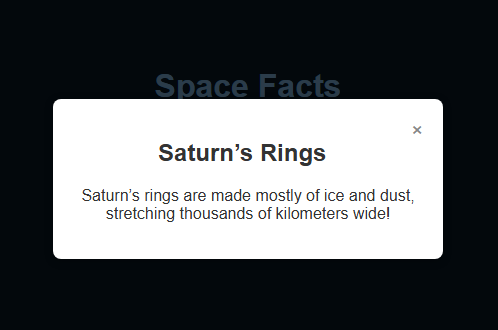
핵심 아이디어:
- 모달은 기본적으로 숨겨져 있습니다(
display: none). - “열기” 버튼을 클릭하면
openModal()함수가 실행되어 →display: block으로 설정됩니다.
- 모달 안의 닫기 버튼(×)을 누르면
closeModal()함수가 실행되어 →display: none으로 설정됩니다. - 모달 바깥(어두운 오버레이)을 클릭해 닫히도록 설정할 수도 있습니다.
<!-- 모달을 여는 버튼 -->
<button onclick="openModal()">Open Modal</button>
<!-- 모달 오버레이 + 콘텐츠 -->
<div id="overlay" style="display:none;">
  <div class="modal">
    <span onclick="closeModal()">×</span>
    <p>This is a modal window.</p>
  </div>
</div>
<script>
  function openModal() {
    document.getElementById("overlay").style.display = "block";
  }
  function closeModal() {
    document.getElementById("overlay").style.display = "none";
  }
</script>
챌린지
쉬움우주를 테마로 한 버튼을 클릭하면 모달 창에 흥미로운 우주 사실이 표시되는 웹페이지가 있습니다. 우주 사실 버튼을 클릭할 때마다 openModal이라는 함수가 실행됩니다. 모달 창이 보이도록 openModal 내부에 코드를 작성하세요.
- 이렇게 하려면 ID가
"fact"인 요소의display속성을"block"으로 설정하세요.
직접 해보기
<!DOCTYPE html>
<html>
<head>
  <title>Space Facts – Modal Example</title>
  <link rel="stylesheet" href="style.css">
</head>
<body>

  <h1>Space Facts</h1>
  <p>Click the button below to learn something cool about space.</p>

  <!-- 모달을 여는 버튼 -->
  <button onclick="openModal('fact')">Fact 1</button>

  <!-- 오버레이 + 모달 콘텐츠 -->
  <div id="overlay" class="overlay" onclick="closeModal()">
    <div id="fact" class="modal">
      <span class="close-btn" onclick="closeModal()">×</span>
      <h2>Shooting Stars</h2>
      <p>Shooting stars are actually tiny meteors burning up as they enter Earth’s atmosphere.</p>
    </div>
  </div>

  <script src="script.js"></script>
</body>
</html>
 실력 점검
실력 점검이 레슨에는 짧은 퀴즈가 포함되어 있습니다. 레슨을 시작해 문제를 풀고 진행 상황을 기록하세요.
JavaScript 실전의 모든 레슨
직접 연습해 보세요: Web 플레이그라운드