








Variables
Parte de la sección Frontend Práctico del Journey de HTML de Coddy. Lección 17 de 35.

Desafío
FácilTenemos una página sobre Deportes extremos. Ahora mismo, no se ve muy bien ni pulida. Durante las próximas lecciones, la mejoraremos paso a paso aplicando lo que hemos aprendido: variables CSS, la estrategia mobile-first y algunas técnicas de tematización.
Así podría verse la página al final (los colores y estilos exactos dependen de ti):
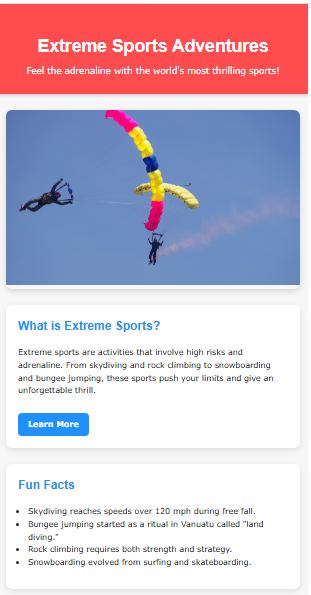
Comenzaremos mejorando el aspecto de la página de Deportes extremos mediante variables CSS.
Tu tarea:
En
:root, crea las siguientes variables:--primary-color--secondary-color--bg-color--text-color--card-bg
Asígnales los valores de color que quieras.
- Aplica estas variables en todos los estilos:
- Establece
--bg-colory--text-colorpara<body>. - Usa
--primary-colorcomo color de fondo de<header>. - Aplica
--card-bgcomo color de fondo de las secciones de descripción y datos curiosos. - Usa
--secondary-colorpara los elementos destacados (por ejemplo: encabezados, botones o texto de acento).
- Establece
Pruébalo tú mismo
<!DOCTYPE html>
<html>
<head>
  <title>Extreme Sports Adventures</title>
  <style>
  /* === Variables === */

  body {
    margin: 0;
    line-height: 1.6;
  }

  header {
    text-align: center;
    padding: 2rem 1rem;
    box-shadow: 0 2px 8px rgba(0,0,0,0.2);
  }

  header h1 {
    font-size: 2.2rem;
    margin-bottom: 0.5rem;
  }

  header p {
    margin: 0;
    font-size: 1.1rem;
  }

  main {
    max-width: 1200px;
    margin: 2rem auto;
    padding: 0 1rem;
    display: flex;
    flex-direction: column;
    gap: 2rem;
  }

  .hero {
    border-radius: 12px;
    overflow: hidden;
    box-shadow: 0 4px 12px rgba(0,0,0,0.15);
  }

  .hero img {
    width: 100%;
    height: 350px;
    object-fit: cover;
  }

  .description, .facts {
    border-radius: 12px;
    padding: 1.5rem;
    box-shadow: 0 4px 12px rgba(0,0,0,0.1);
  }

  .description h2, .facts h2 {
    margin-top: 0;
  }

  .btn {
    display: inline-block;
    margin-top: 1rem;
    padding: 10px 20px;
    color: #fff;
    text-decoration: none;
    font-weight: bold;
    border-radius: 8px;
    transition: transform 0.3s, background-color 0.3s;
  }

  .btn:hover {
    transform: scale(1.05);
  }

  ul {
    padding-left: 20px;
  }
</style>
</head>
<body>
<header>
  <h1>Extreme Sports Adventures</h1>
  <p>Feel the adrenaline with the world's most thrilling sports!</p>
</header>

<main>
  <section class="hero">
    <img src="https://upload.wikimedia.org/wikipedia/commons/thumb/3/32/Parachuting_sport.jpg/960px-Parachuting_sport.jpg" alt="Skydiving">
  </section>

  <section class="description">
    <h2>What is Extreme Sports?</h2>
    <p>Extreme sports are activities that involve high risks and adrenaline. From skydiving and rock climbing to snowboarding and bungee jumping, these sports push your limits and give an unforgettable thrill.</p>
    <a href="#" class="btn">Learn More</a>
  </section>

  <section class="facts">
    <h2>Fun Facts</h2>
    <ul>
      <li>Skydiving reaches speeds over 120 mph during free fall.</li>
      <li>Bungee jumping started as a ritual in Vanuatu called "land diving."</li>
      <li>Rock climbing requires both strength and strategy.</li>
      <li>Snowboarding evolved from surfing and skateboarding.</li>
    </ul>
  </section>
</main>
</body>
</html>Todas las lecciones de Frontend Práctico
Practica por tu cuenta: Playground de Web