








복습 챌린지
Coddy HTML 여정의 CSS 마스터 섹션에 포함된 레슨. 43개 중 34번째.

챌린지
쉬움CSS Grid를 사용하여 아래 이미지와 같이 헤더와 한 줄에 3개의 이미지가 있는 갤러리가 포함된 깔끔한 레이아웃을 만드세요:
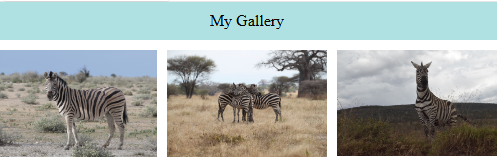
.container를display: grid로 설정하고 아이템 사이에gap을 추가하세요.- 2개의 행(rows)과 3개의 열(columns)로 그리드를 생성하세요.
다음과 같이 그리드 영역을 정의하세요:
grid-template-areas: "header header header" "img1 img2 img3";grid-area속성을 사용하여 각 그리드 아이템을 해당 영역에 할당하세요.
직접 해보기
<!DOCTYPE html>
<html>
<head>
  <style>
    body{
        margin: 0;
        padding: 0;
    }
    img{
        width: 100%;
    }
    .header{
        text-align: center;
        padding: 10px;
        background-color: #afe1e3;
    }
    /* Add you CSS code here */

  </style>
</head>
<body>
  <div class="container">
    <div class="header">My Gallery</div>
    <div class="img1"><img src="https://upload.wikimedia.org/wikipedia/commons/1/1b/Burchell%27s_zebra_%28Equus_quagga_burchellii%29_2.jpg"></div>
    <div class="img2"><img src="https://upload.wikimedia.org/wikipedia/commons/3/39/Zebra_zebras_-_tarangire_tanzania_africa.jpg"></div>
    <div class="img3"><img src="https://upload.wikimedia.org/wikipedia/commons/1/11/Zebra-Lake_Nakuru.jpg"></div>
</div>
</body>
</html>
CSS 마스터의 모든 레슨
직접 연습해 보세요: Web 플레이그라운드