








モーダル(開く/閉じる)
CoddyのHTMLジャーニー「JavaScriptの実践」セクションの一部。レッスン 3/27。
モーダルとは、ユーザーの注意を引くためにページの「最前面」に表示される小さなウィンドウです。ログインフォーム、通知、確認によく使われます。次のように表示されます:
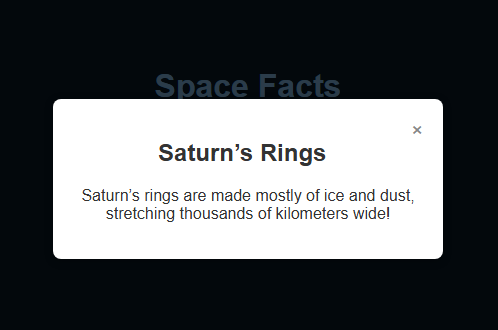
重要なポイント:
- モーダルはデフォルトで非表示です(
display: none)。 - 「開く」ボタンをクリックすると、
openModal()関数が実行され、display: blockに設定されます。
- モーダル内の閉じるボタン(×)を押すと、
closeModal()関数が実行され、display: noneが設定されます。 - モーダルの外側(暗いオーバーレイ上)をクリックして閉じられるようにすることもよくあります。
<!-- モーダルを開くボタン -->
<button onclick="openModal()">Open Modal</button>
<!-- モーダルのオーバーレイとコンテンツ -->
<div id="overlay" style="display:none;">
  <div class="modal">
    <span onclick="closeModal()">×</span>
    <p>This is a modal window.</p>
  </div>
</div>
<script>
  function openModal() {
    document.getElementById("overlay").style.display = "block";
  }
  function closeModal() {
    document.getElementById("overlay").style.display = "none";
  }
</script>
チャレンジ
簡単宇宙をテーマにしたボタンを備えたウェブページがあり、モーダルウィンドウに興味深い宇宙の豆知識を表示します。宇宙の豆知識ボタンがクリックされると、openModalという関数が呼び出されます。モーダルウィンドウが表示されるように、openModalの中にコードを書いてください。
- そのために、IDが
"fact"の要素のdisplayプロパティを"block"に設定してください。
自分で試してみよう
<!DOCTYPE html>
<html>
<head>
  <title>Space Facts – Modal Example</title>
  <link rel="stylesheet" href="style.css">
</head>
<body>

  <h1>Space Facts</h1>
  <p>Click the button below to learn something cool about space.</p>

  <!-- モーダルを開くボタン -->
  <button onclick="openModal('fact')">Fact 1</button>

  <!-- オーバーレイとモーダルのコンテンツ -->
  <div id="overlay" class="overlay" onclick="closeModal()">
    <div id="fact" class="modal">
      <span class="close-btn" onclick="closeModal()">×</span>
      <h2>Shooting Stars</h2>
      <p>Shooting stars are actually tiny meteors burning up as they enter Earth’s atmosphere.</p>
    </div>
  </div>

  <script src="script.js"></script>
</body>
</html>
 腕試し
腕試しこのレッスンには短いクイズがあります。レッスンを始めて解答し、進捗を記録しましょう。
JavaScriptの実践のすべてのレッスン
自分で練習してみよう: Webプレイグラウンド