








変数
CoddyのHTMLジャーニー「実践的フロントエンド」セクションの一部。レッスン 17/35。

チャレンジ
簡単Extreme Sports(エクストリーム・スポーツ)に関するページがあります。今のところ、あまり見栄えが良くなく、洗練されていません。これからの数回のレッスンを通して、学んだことを応用しながら、一歩ずつ改善していきます。具体的には、CSS変数、モバイルファースト戦略、そしていくつかのテーマ設定テクニックを適用します。
最終的なページの見た目は以下のようになります(正確な色やスタイルはあなた次第です):
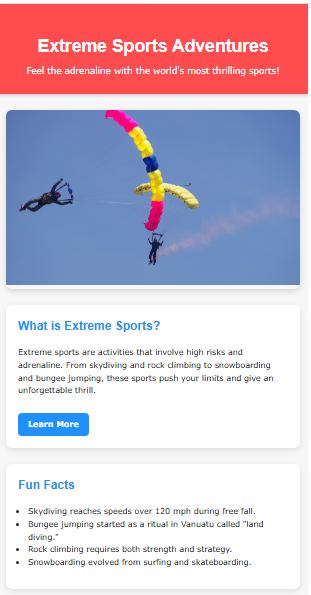
まずは、CSS変数を使用して、Extreme Sportsページの見た目を改善することから始めましょう。
あなたのタスク:
:root内で、以下の変数を作成してください:--primary-color--secondary-color--bg-color--text-color--card-bg
これらにお好みの色を割り当ててください。
- これらの変数全体にスタイルを適用します:
<body>に対して--bg-colorと--text-colorを設定します。<header>の背景色として--primary-colorを使用します。- description(説明)セクションと fun facts(豆知識)セクションの背景色として
--card-bgを適用します。 - ハイライト(例:見出し、ボタン、アクセントテキストなど)に
--secondary-colorを使用します。
自分で試してみよう
<!DOCTYPE html>
<html>
<head>
  <title>Extreme Sports Adventures</title>
  <style>
  /* === Variables === */

  body {
    margin: 0;
    line-height: 1.6;
  }

  header {
    text-align: center;
    padding: 2rem 1rem;
    box-shadow: 0 2px 8px rgba(0,0,0,0.2);
  }

  header h1 {
    font-size: 2.2rem;
    margin-bottom: 0.5rem;
  }

  header p {
    margin: 0;
    font-size: 1.1rem;
  }

  main {
    max-width: 1200px;
    margin: 2rem auto;
    padding: 0 1rem;
    display: flex;
    flex-direction: column;
    gap: 2rem;
  }

  .hero {
    border-radius: 12px;
    overflow: hidden;
    box-shadow: 0 4px 12px rgba(0,0,0,0.15);
  }

  .hero img {
    width: 100%;
    height: 350px;
    object-fit: cover;
  }

  .description, .facts {
    border-radius: 12px;
    padding: 1.5rem;
    box-shadow: 0 4px 12px rgba(0,0,0,0.1);
  }

  .description h2, .facts h2 {
    margin-top: 0;
  }

  .btn {
    display: inline-block;
    margin-top: 1rem;
    padding: 10px 20px;
    color: #fff;
    text-decoration: none;
    font-weight: bold;
    border-radius: 8px;
    transition: transform 0.3s, background-color 0.3s;
  }

  .btn:hover {
    transform: scale(1.05);
  }

  ul {
    padding-left: 20px;
  }
</style>
</head>
<body>
<header>
  <h1>Extreme Sports Adventures</h1>
  <p>Feel the adrenaline with the world's most thrilling sports!</p>
</header>

<main>
  <section class="hero">
    <img src="https://upload.wikimedia.org/wikipedia/commons/thumb/3/32/Parachuting_sport.jpg/960px-Parachuting_sport.jpg" alt="Skydiving">
  </section>

  <section class="description">
    <h2>What is Extreme Sports?</h2>
    <p>Extreme sports are activities that involve high risks and adrenaline. From skydiving and rock climbing to snowboarding and bungee jumping, these sports push your limits and give an unforgettable thrill.</p>
    <a href="#" class="btn">Learn More</a>
  </section>

  <section class="facts">
    <h2>Fun Facts</h2>
    <ul>
      <li>Skydiving reaches speeds over 120 mph during free fall.</li>
      <li>Bungee jumping started as a ritual in Vanuatu called "land diving."</li>
      <li>Rock climbing requires both strength and strategy.</li>
      <li>Snowboarding evolved from surfing and skateboarding.</li>
    </ul>
  </section>
</main>
</body>
</html>実践的フロントエンドのすべてのレッスン
自分で練習してみよう: Webプレイグラウンド