








Setting the grid
Part of the CSS Mastery section of Coddy's HTML journey. Lesson 35 of 43.

Challenge
EasyIn this series, we'll build a responsive website layout using CSS Grid.
First, let’s take a look at what we’ll be creating:
A website with:
- A header
- A sidebar
- A main content area
- A footer
Here’s what it will look like when we’re done:
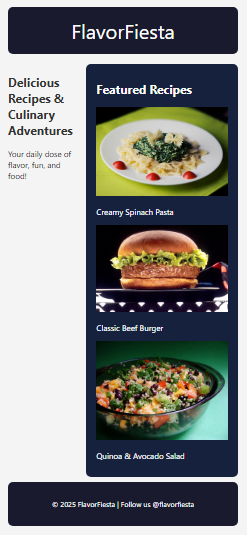
Let’s start by creating the overall grid structure for the website! Your Tasks:
- Turn the
.containerinto a grid layout. - Create a 3-column structure.
- Define three rows: one for the header, one for the main content, and one for the footer.
- Use grid area names to arrange the layout like this:
"header header header" "hero featured featured" “footer footer footer”
5. Add some spacing between the items and around the container to make it look clean.
6. Assign the correct grid-area name to each section using class selectors: .header, .hero, .featured, and .footer
Try it yourself
<html>
<head>
  <title>FlavorFiesta</title>
  <link rel="stylesheet" href="styles.css">
</head>
<body>
  <div class="container">
    <header class="header">FlavorFiesta</header>

    <section class="hero">
      <h1>Delicious Recipes & Culinary Adventures</h1>
      <p>Your daily dose of flavor, fun, and food!</p>
    </section>

    <section class="featured">
      <h2>Featured Recipes</h2>
      <div class="recipe-grid">
        <div class="recipe-card">
          <img src="https://upload.wikimedia.org/wikipedia/commons/a/a0/Food-pasta-spinach_%2824218510092%29.jpg" alt="Pasta">
          <p> Creamy Spinach Pasta</p>
        </div>
        <div class="recipe-card">
          <img src="https://upload.wikimedia.org/wikipedia/commons/6/62/NCI_Visuals_Food_Hamburger.jpg" alt="Burger">
          <p> Classic Beef Burger</p>
        </div>
        <div class="recipe-card">
          <img src="https://upload.wikimedia.org/wikipedia/commons/1/1e/Quinoa%2C_Black_Bean%2C_and_Mango_Salad.png" alt="Salad">
          <p> Quinoa & Avocado Salad</p>
        </div>
      </div>
    </section>
    <footer class="footer">
      <p>© 2025 FlavorFiesta | Follow us @flavorfiesta</p>
    </footer>
  </div>
</body>
</html>
All lessons in CSS Mastery
1Selector Mastery – Combination
IntroductionDescendant SelectorChild SelectorAdjacent Sibling SelectorGeneral Sibling SelectorRecap ChallengePractice on your own: Web playground