








Style the Header Section
Part of the CSS Mastery section of Coddy's HTML journey. Lesson 26 of 43.

Challenge
EasyIn this mini-project, you’ll bring a fun hobbies landing page to life: using only CSS.
The HTML is already written for you. Your job is to style it step by step, just like a real front-end developer. It’s a great way to practice real-world layout, buttons, and styling tricks!
Here’s a preview of what you’ll build at the end:
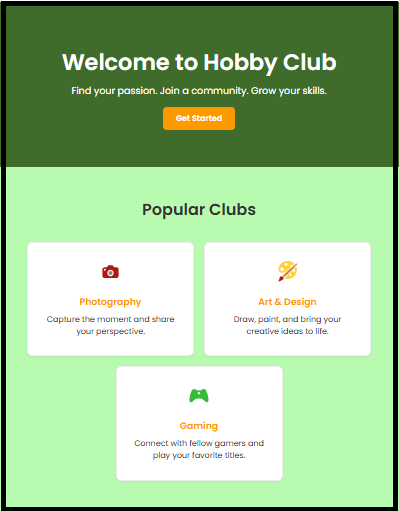
In the first challenge, we’ll start by styling the top part of the page: the header (also called the "hero" section). Right now, it’s just plain text sitting at the top. Your goal is to turn it into a clean, eye-catching introduction to the page.
Your CSS Challenge:
- Remove default spacing: set
margin: 0on thebodyand add a background color to it. - Style the
.herosection with a background color (rgb(30, 207, 104)) and padding 50px. - Use Flexbox on
.heroto center everything:display: flexflex-direction: columnalign-items: centerjustify-content: centertext-align: center
- Use
.hero h1and.hero pto style the text.
Make sure the top section looks clean and eye-catching.
Try it yourself
<html>
<head>
  <title>Hobby Club Landing Page</title>
  <link rel="stylesheet" href="styles.css">
</head>
<body>

  <header class="hero">
      <div class="container">
        <h1>Welcome to Hobby Club</h1>
        <p>Find your passion. Join a community. Grow your skills.</p>
        <a href="#" class="btn">Get Started</a>
      </div>
  </header>

  <section class="features">
    <h2 class="section-title">Popular Clubs</h2>
    <div class="cards">
      <div class="feature">
        <div class="icon"><img src="https://upload.wikimedia.org/wikipedia/commons/f/fa/Android_Emoji_1f4f7_red.svg" width="20px"></div>
        <h3>Photography</h3>
        <p>Capture the moment and share your perspective.</p>
      </div>
      <div class="feature">
        <div class="icon"><img src="https://upload.wikimedia.org/wikipedia/commons/5/51/Emoji_u1f3a8.svg" width="20px"></div>
        <h3>Art & Design</h3>
        <p>Draw, paint, and bring your creative ideas to life.</p>
      </div>
      <div class="feature">
        <div class="icon"><img src="https://upload.wikimedia.org/wikipedia/commons/e/e6/Emoji_u1f3ae.svg" width="20px"></div>
        <h3>Gaming</h3>
        <p>Connect with fellow gamers and play your favorite titles.</p>
      </div>
    </div>
  </section>

</body>
</html>
All lessons in CSS Mastery
1Selector Mastery – Combination
IntroductionDescendant SelectorChild SelectorAdjacent Sibling SelectorGeneral Sibling SelectorRecap Challenge3Structural pseudo-classes
Structural pseudo-classesTargeting the First ChildTargeting the Last ChildPattern Power: Using nth-childRecap Challenge6Landing Page
Style the Header SectionStyle the buttonSection Layout Card Layout Add Finishing TouchesPractice on your own: Web playground