








Recap - Basic Form
Part of the Fundamentals section of Coddy's HTML journey. Lesson 40 of 60.

Challenge
EasyCreate an HTML document as shown in the picture below:
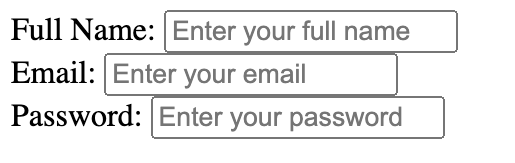
It should include three label-input pairs:
- A label with the text "Full Name:" associated with a text input field. The input field should have the name "fullname" and a placeholder that says "Enter your full name".
- A label with the text "Email:" associated with a text input field. The input field should have the name "email" and a placeholder that says "Enter your email".
- A label with the text "Password:" associated with a password input field. The input field should have the name "userpassword" and a placeholder that says "Enter your password". Set the maximum length of this field to 20 characters.
Try it yourself
<!DOCTYPE html>
<html>
    <body>
        <!-- Write code here -->
    </body>
</html>All lessons in Fundamentals
2Text and Formatting
HeadingsParagraphsLine BreaksBold and Italic TextBold and Italic AgainRecap - Formatting8Forms and Inputs Part 1
Form BasicsText InputsInput AttributesPassword FieldLabels for InputsRecap - Basic Form11Event Registration Page
Project OverviewHeader Section Event Details SectionRegistration FormFooter Section
9Forms and Inputs Part 2
Radio ButtonsCheckboxesDropdownsButtonsButtons in FormsRecap - Forms #1Recap - Forms #2Practice on your own: Web playground