








Spanning Rows and Columns
Part of the Fundamentals section of Coddy's HTML journey. Lesson 50 of 60.
In HTML, you can make table cells span multiple rows or columns using the rowspan and colspan attributes. These attributes allow you to create more complex table layouts by merging cells together.
The colspan attribute is used to specify the number of columns a cell should span. It is added to the <td> or <th> tag of the cell that you want to expand.
Here's an example of how to use colspan:
<table border="1">
	<tr>
		<th colspan="2">Name</th>
	</tr>
	<tr>
		<td>John</td>
		<td>Doe</td>
	</tr>
</table>
In this example, the header cell with the text "Name" spans two columns. This is useful for creating a header that covers multiple columns. This is how it looks like:

The rowspan attribute is used to specify the number of rows a cell should span. It is also added to the <td> or <th> tag of the cell that you want to expand.
Here's an example of how to use rowspan:
<table border="1">
  <tr>
    <th>Employee</th>
    <th>Shift</th>
  </tr>
  <tr>
    <td rowspan="2">Alex</td>
    <td>Morning</td>
  </tr>
  <tr>
    <td>Evening</td>
  </tr>
</table>
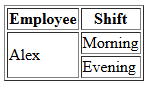
Here, rowspan is used to show that Alex works both morning and evening shifts without repeating the name.
You can use both colspan and rowspan in the same table to create complex layouts. Just remember to adjust the number of cells in each row accordingly to accommodate the spanned cells.

Challenge
EasyCreate an HTML document that includes a table with cells that span multiple rows and columns. The table should have the following structure:
- A table row (
<tr>) with a header cell (<th>) that spans three columns and contains the text"Student Report". - Another table row (
<tr>) with a header cell (<th>) that says"Name", a header cell (<th>) that says"Subject", and a header cell (<th>) that says"Grade". - Another table row (
<tr>) with a data cell (<td>) that says"John Doe", a data cell (<td>) that says"Math", and a data cell (<td>) that says"A". - Another table row (
<tr>) with a data cell (<td>) that spans two rows and contains the text"Jane Smith", a data cell (<td>) that says"Science", and a data cell (<td>) that says"B". - A final table row (
<tr>) with a data cell (<td>) that says"History"and a data cell (<td>) that says"A".
Try it yourself
<!DOCTYPE html>
<html>
<body>
<table border="1">
<!-- Write code here -->
</table>
</body>
</html> Test yourself
This lesson includes a short quiz. Start the lesson to answer it and track your progress.
All lessons in Fundamentals
2Text and Formatting
HeadingsParagraphsLine BreaksBold and Italic TextBold and Italic AgainRecap - Formatting8Forms and Inputs Part 1
Form BasicsText InputsInput AttributesPassword FieldLabels for InputsRecap - Basic Form11Event Registration Page
Project OverviewHeader Section Event Details SectionRegistration FormFooter Section
9Forms and Inputs Part 2
Radio ButtonsCheckboxesDropdownsButtonsButtons in FormsRecap - Forms #1Recap - Forms #2Practice on your own: Web playground