








Recap - Forms #2
Part of the Fundamentals section of Coddy's HTML journey. Lesson 47 of 60.

Challenge
EasyLet's build a simple registration form just like the one in the picture below!
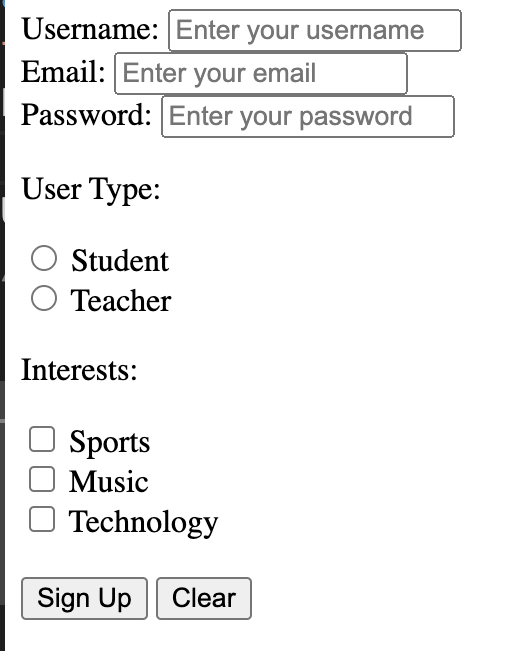
Here’s what to include:
- A
<form>tag to wrap everything together. - A Username field with a label and a text input. The label should say
"Username:"and use for="username". The input should haveid="username",name="username",type="text", and placeholder"Enter your username". - An Email field with a label and an email input. The label should say
"Email:"and usefor="email". The input should haveid="email",name="email",type="email", and placeholder"Enter your email". - A Password field with a label and a password input. The label should say
"Password:"and usefor="userpassword". The input should haveid="userpassword",name="userpassword",type="password", and placeholder"Enter your password". - A group of radio buttons to let users select their type:
"Student"or"Teacher". Add a paragraph or heading that says"User Type:"above the radio buttons. The"Student"radio button should haveid="student",name="usertype",value="student", and a label that says"Student". The"Teacher"radio button should haveid="teacher",name="usertype",value="teacher", and a label that says"Teacher". Remember: both radio buttons must have the same name attribute ("usertype") so only one can be selected at a time. - A group of checkboxes to let users choose their interests:
"Sports","Music", and"Technology". Add a paragraph or heading that says"Interests:"above the checkboxes. The"Sports"checkbox should haveid="sports",name="interests",value="sports", and a label that says"Sports". The"Music"checkbox should haveid="music",name="interests",value="music", and a label that says"Music". The"Technology"checkbox should haveid="technology",name="interests",value="technology", and a label that says"Technology". Remember: all checkboxes should have the same name attribute ("interests") since they're in the same group. - A Sign Up button and a Clear button at the end of the form. The Sign Up button should have
type="submit"and the Clear button should havetype="reset". The Sign Up button should display the text "Sign Up" and the Clear button should display the text “Clear”.
Make sure to include proper labels and titles for a user-friendly experience!
Remember, the inputs should include these important attributes:
type,id,name, andvalue.
Try it yourself
<!DOCTYPE html>
<html>
    <body>
        <!-- Write code here -->
    </body>
</html>All lessons in Fundamentals
2Text and Formatting
HeadingsParagraphsLine BreaksBold and Italic TextBold and Italic AgainRecap - Formatting8Forms and Inputs Part 1
Form BasicsText InputsInput AttributesPassword FieldLabels for InputsRecap - Basic Form11Event Registration Page
Project OverviewHeader Section Event Details SectionRegistration FormFooter Section
9Forms and Inputs Part 2
Radio ButtonsCheckboxesDropdownsButtonsButtons in FormsRecap - Forms #1Recap - Forms #2Practice on your own: Web playground