








Registration Form
Part of the Fundamentals section of Coddy's HTML journey. Lesson 55 of 60.

Challenge
EasyAfter the event details section, create a <section> for the registration form like on the picture below.
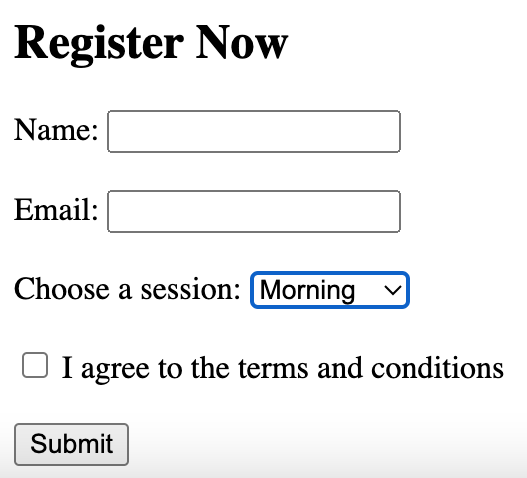
Inside the <section>, add the following:
- An
<h2>tag with the textRegister Now. - A
<form>tag that contains:- An input field for the name with a
typeof "text" and anameofname. - An input field for the email with a
typeof "email" and anameofemail. - A dropdown menu for selecting a session, allowing the user to choose either
MorningorAfternoon. - A checkbox to agree to the terms, along with a
<label>next to it. - A submit button.
- An input field for the name with a
Try it yourself
<!DOCTYPE html>
<html>
    <body>
        <!-- Write code here -->
    </body>
</html>All lessons in Fundamentals
2Text and Formatting
HeadingsParagraphsLine BreaksBold and Italic TextBold and Italic AgainRecap - Formatting8Forms and Inputs Part 1
Form BasicsText InputsInput AttributesPassword FieldLabels for InputsRecap - Basic Form11Event Registration Page
Project OverviewHeader Section Event Details SectionRegistration FormFooter Section
9Forms and Inputs Part 2
Radio ButtonsCheckboxesDropdownsButtonsButtons in FormsRecap - Forms #1Recap - Forms #2Practice on your own: Web playground