








Recap Challenge #1
Part of the Styling with CSS section of Coddy's HTML journey. Lesson 29 of 76.

Challenge
EasyNow that you've mastered various techniques for styling text and backgrounds using CSS, it's time to put your knowledge to the test with a comprehensive challenge. You'll apply what you've learned about colors, hex codes, RGB values and transparency with RGBA to create a specific design.
You are given an HTML document with a heading (<h1>), a paragraph (<p>), and a division (<div>). Your task is to use the text and background styling properties you've learned to style these elements to match the design shown in the image below:
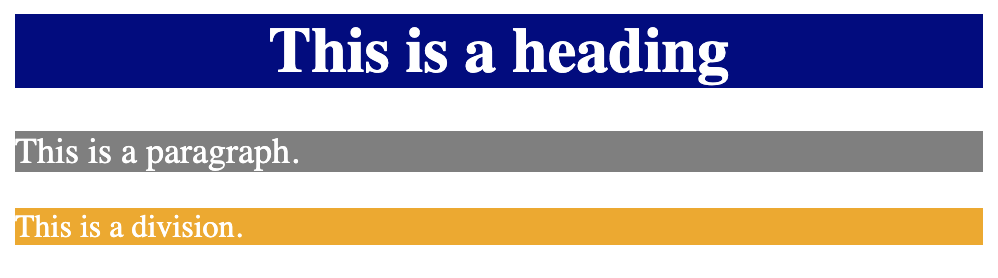
Follow the steps below:
- Write a CSS rule that targets the
<h1>element. Set thecolortowhite, thebackground-colorto#000080(navy blue), and thetext-aligntocenter. - Write a CSS rule that targets the
<p>element. Set thecolorto#FFFFFF(white), thebackground-colortorgba(0, 0, 0, 0.5)(semi-transparent black), and thefont-sizeto18px. - Write a CSS rule that targets the
<div>element. Set thebackground-colortorgba(237, 170, 26, 1)(golden yellow) and thecolortowhite.
Try it yourself
<html>
<head>
    <title>Recap Challenge #1</title>
    <style>
        /* Write CSS rules here */
    </style>
</head>
<body>
    <h1>This is a heading</h1>
    <p>This is a paragraph.</p>
    <div>This is a division.</div>
</body>
</html>All lessons in Styling with CSS

5 Colors and Backgrounds
Background ColorHEX ColorsRGB ColorsTransparency with RGBARecap Challenge #1Practice on your own: Web playground